Why table extraction feels solved—until it isn’t
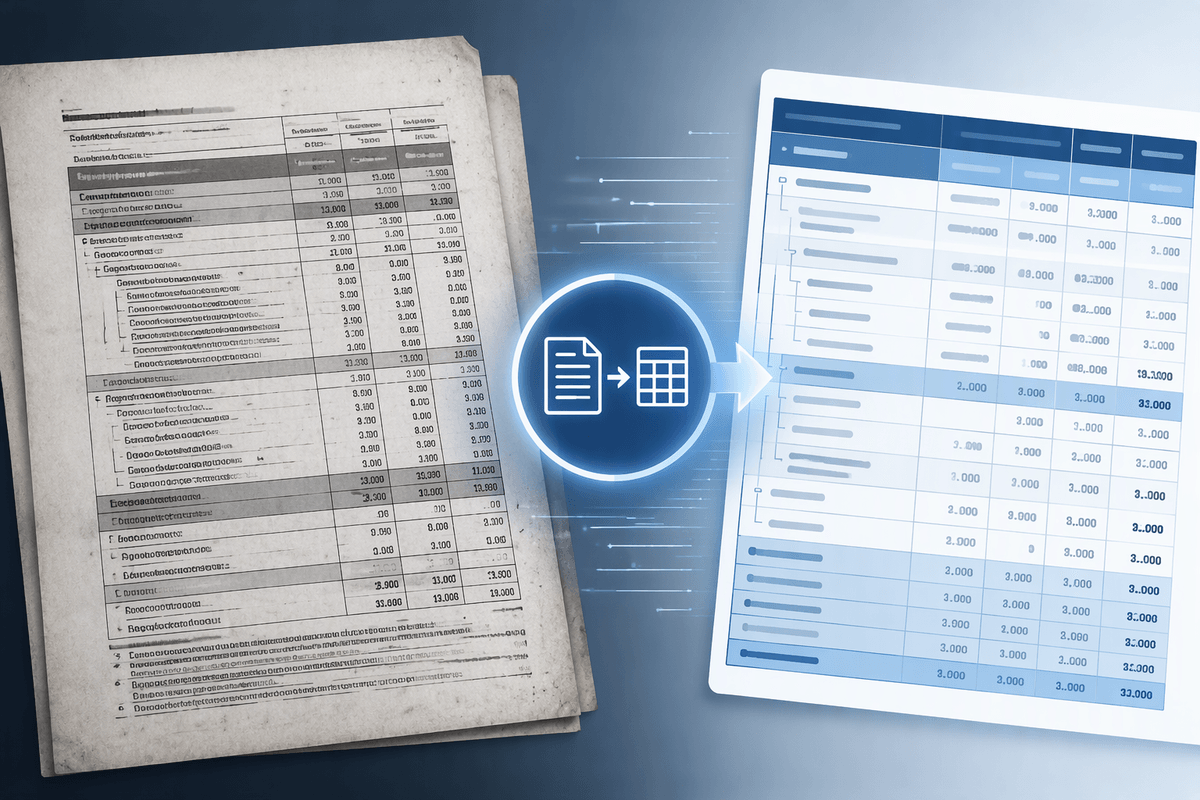
You open a scanned PDF, see a clean grid, and assume extraction will be a one-click problem. On simple invoices or bank statements, it often is. Most tools can find ruling lines, detect columns, and return something that looks like a table in Excel or CSV. The trouble is that “looks right” can hide small structural errors that matter in reporting and compliance: a header shifted one column, a merged cell split into two fields, or totals pulled as regular rows.
Those mistakes show up when the page stops behaving like a textbook table. Multi-level headers, notes embedded inside the grid, two tables stacked with minimal spacing, or a sideways label can cause the extractor to guess the wrong boundaries. Because scans don’t contain real cell structure, the tool is inferring it from pixels, and inference has limits. You either pay for careful review and cleanup, or you accept that a small percentage of pages will quietly produce wrong numbers.
What AI actually does to find rows and cells
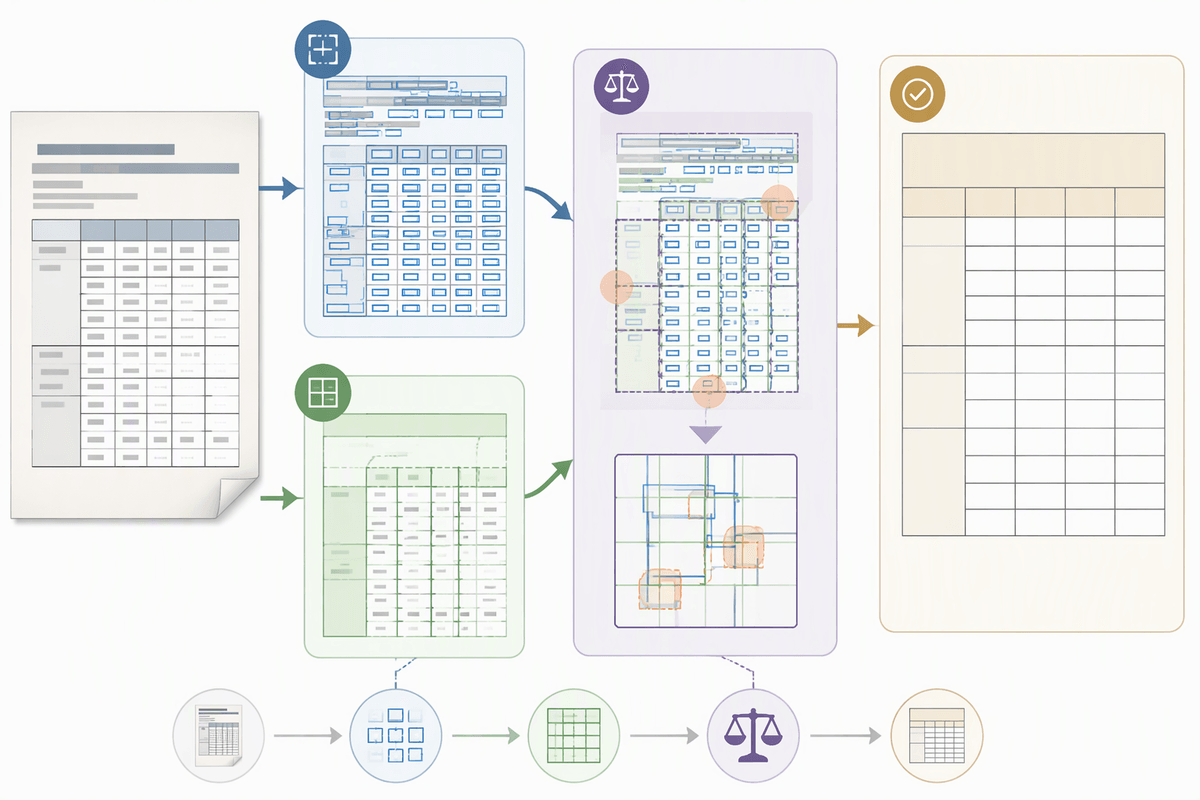
When a tool “extracts a table” from a scan, it usually runs two jobs in parallel: turning pixels into text (OCR) and turning the page into geometry (layout). The OCR produces words with bounding boxes and reading order guesses. The layout step looks for cues like ruling lines, consistent whitespace gaps, aligned text edges, and repeating baselines to infer columns and row bands. Some systems start from detected lines and fit cells; others start from text boxes and cluster them into a grid; many blend both approaches and then reconcile conflicts.
The output is rarely a single confident answer. It’s a set of best-fit boundaries plus heuristics for merged cells, header regions, and totals-like rows. That’s why small spacing changes can flip a value into the wrong column, or make a header look like data. The higher accuracy usually means heavier models, slower processing, and more manual verification when confidence drops.
Complex layouts that confuse even strong models
You’ll notice failures fastest on pages that mix “table logic” with “page design.” A multi-level header with spanning labels forces the model to decide whether the top label belongs to one column or a group, and a single wrong merge cascades into every downstream field name. The same thing happens when a table uses indented sub-rows (like account rollups) where the indentation communicates hierarchy, not a new column.
Rotation and density make the geometry step brittle. Sideways headers, diagonal text, or narrow columns push OCR boxes out of alignment, so the grid fit starts snapping values to the nearest plausible column edge. Two tables separated by a thin gap can be merged into one, while footnotes inside the border get treated as data rows. None of this is exotic; it’s common in finance schedules and compliance reports. The “almost right” outputs take longer to validate than obviously broken ones, because the errors hide in plausible-looking structure.
Scan quality issues that amplify layout mistakes
You can also have a perfectly reasonable layout and still get bad extraction because the scan itself distorts the cues the model relies on. Low resolution softens ruling lines and makes thin grid borders disappear, so the tool switches to whitespace and alignment guesses. Skew and page curl bend baselines, turning a straight column edge into a slight diagonal that pushes values into neighboring cells. Over-aggressive compression adds speckle that OCR reads as punctuation or digits, which then changes how text boxes cluster into rows.
Practical fixes exist, but they add cost and processing time. Deskewing, dewarping, and boosting contrast can dramatically stabilize column boundaries, yet the same cleanup can also erase faint lines or wash out light gray header shading that was the only separator. Mixed-page PDFs are especially risky: one page scanned at 300 dpi extracts cleanly, while the next at 150 dpi silently shifts a column. Treat scan QA as part of table QA, not a separate step.
How to evaluate tools with realistic test pages
A realistic test set should include the pages that cause problems in everyday work, not just the clean examples used in demos. Select 20–30 representative pages from your own archives, covering common trouble spots such as multi-level headers with spanning labels, tables with indented sub-rows, multiple tables on one page, footnotes inside table borders, rotated headers, and low-quality scans with skew, blur, or compression artifacts. Include straightforward pages as well, since some tools handle complex layouts reasonably well but perform less consistently or take longer on simpler grids.
Evaluate the extracted structure alongside text accuracy. Check whether header hierarchies remain intact, merged cells are preserved, totals and subtotals retain their proper row types, and separate tables stay distinct. A useful measure is how many pages pass a downstream check, such as reconciling column totals or confirming that required fields are populated, without manual correction. Record processing time, exception handling, and the effort required to review results. Small alignment errors often demand more human attention than obvious OCR mistakes, so the time spent finding and correcting them should be part of the evaluation.
Workflows that make complex tables extractable
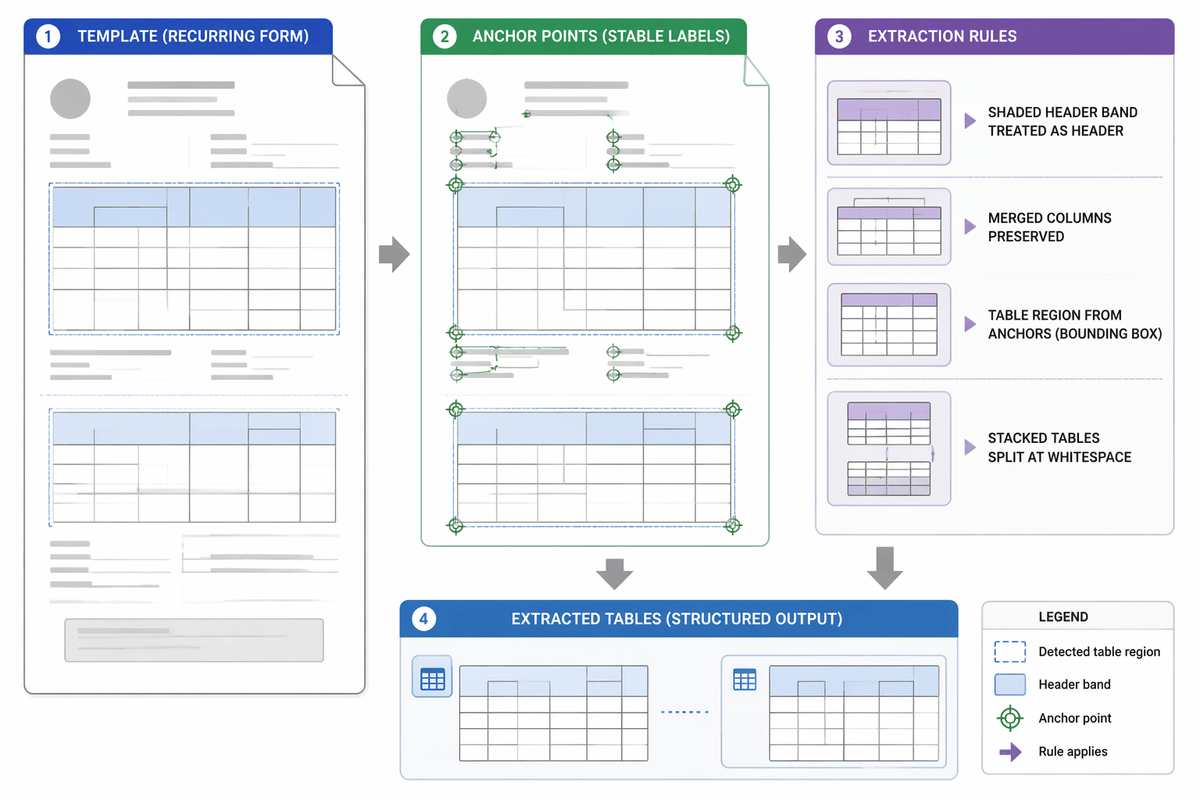
A familiar moment: you get a file where the table is “extractable,” but only if you tell the system what to ignore and what to lock down. A workable workflow usually starts with page normalization before you ever touch extraction: deskew, consistent DPI, and a quick pass that separates pages with landscape tables or heavy rotation into their own batch. Then extract twice—once in a “lines-first” mode (if available) and once in a “text-cluster” mode—and compare where they disagree. Those disagreements are where you focus review, instead of eyeballing every row.
For recurring forms, templates beat general intelligence. Define the table region, anchor it to stable labels, and add rules like “treat shaded header bands as header,” “keep these columns merged,” or “split stacked tables at this whitespace threshold.” For one-off reports, light structure helps: manually box the table, delete footnotes inside borders, and re-run just that page. The cost is real: building templates and exception queues takes upfront time, and you still need a human spot-check step, but it turns unpredictable failures into manageable, measurable work.
When to stop fighting the layout and switch approaches
You’ll feel the tipping point when extraction turns into repeated “almost fixes”: each run needs a new crop box, a new rule for a merged header, or a manual patch that breaks the next page. If you’re spending more time policing structure than using the data, switch approaches. For small volumes, a controlled manual capture step (double-entry for critical fields) can be cheaper than chasing edge cases. For recurring packages, push upstream: request a native export, add a reporting-friendly appendix, or standardize the table layout. The operating rule: optimize for verified downstream usability, not best-looking cells.